
Login
This page UFOX Login Guide.
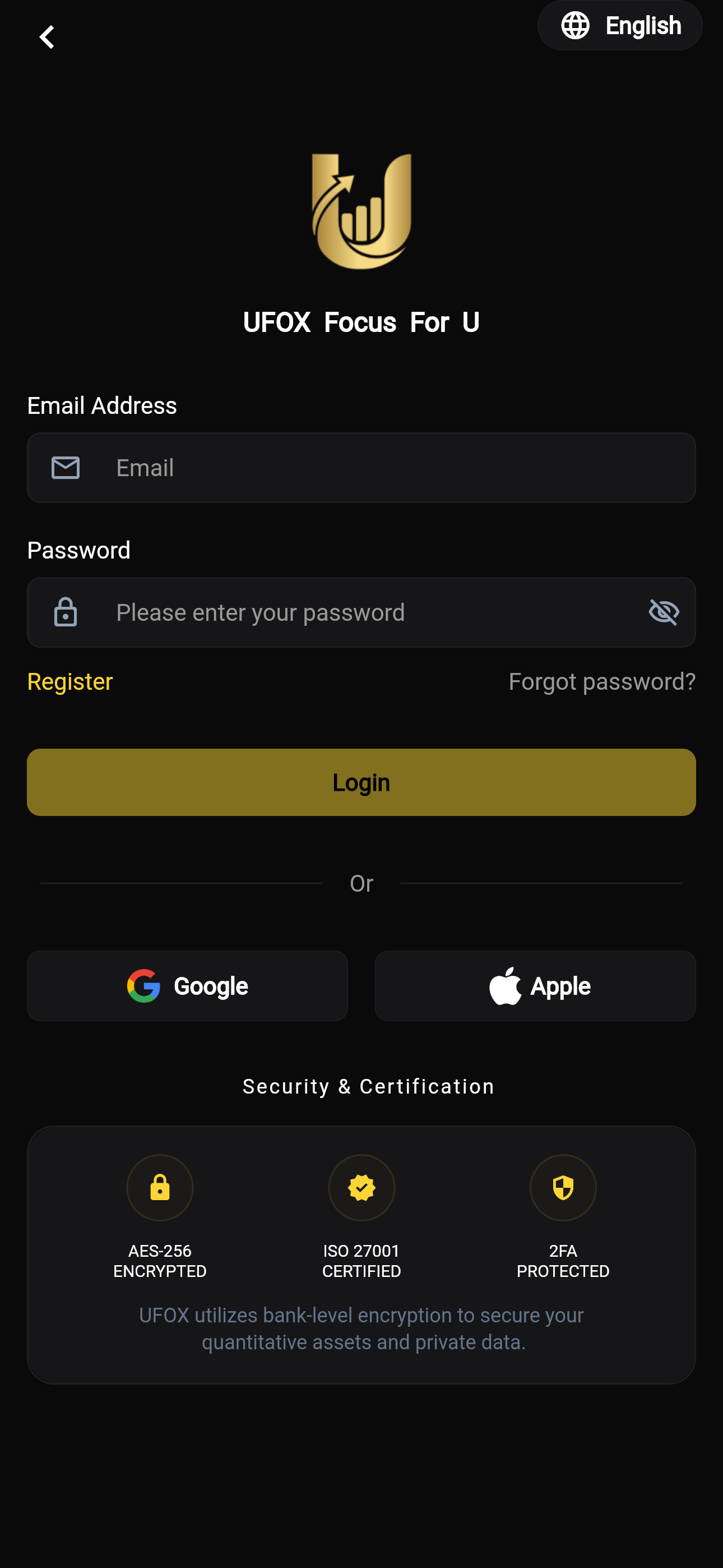
UFOX Account Login Guide
Welcome back to UFOX (Focus For U)! Access your account securely by following the steps below.
🔑 Step-by-Step Login Guide
1. Select Language (Optional)
- If you need to change the interface language, tap the language button (e.g., "English") with the globe icon located in the top right corner of the screen.
2. Enter Email Address
- In the "Email" input field, enter the email address associated with your registered UFOX account.
3. Enter Password
- Input your account password in the "Please enter your password" field.
- Tip: Tap the "eye" icon on the right side of the password field to reveal the text and ensure you have typed it correctly before submitting.
4. Login to Your Account
- Once your email and password are entered, tap the large gold "Login" button to access your dashboard.
🔗 Additional Account Options
- Need to create an account? Tap the gold "Register" link located just above the Login button on the left side to navigate to the registration page.
- Forgot your password? If you cannot remember your password, tap the "Forgot password?" link on the right side to initiate the secure password recovery process.
🚀 Quick Login Options (Coming Soon)
To make accessing your account even easier, we are currently developing seamless third-party login integrations.
- Sign in with Google: Currently under development and will be enabled in a future update.
- Sign in with Apple: Currently under development and will be enabled in a future update.
(Please continue to use your registered email address and password to log in for the time being. We appreciate your patience!)