
🚀 Futures Fixed DCA Bot
Scheduled Fixed-Investment Strategy with Leverage for Crypto Futures
📌 Overview
The Futures Fixed DCA Bot is a manual futures strategy that opens fixed scheduled investments while allowing users to configure leverage, order count, execution period, and profit controls.
It is designed for users who want a rule-based futures plan rather than AI-managed timing. The bot follows the selected schedule and parameters, while leverage increases both opportunity and risk.
📌 USDT-M futures market
📌 Fixed scheduled entries
📌 User-defined rules with leverage control
🧭 Strategy Card
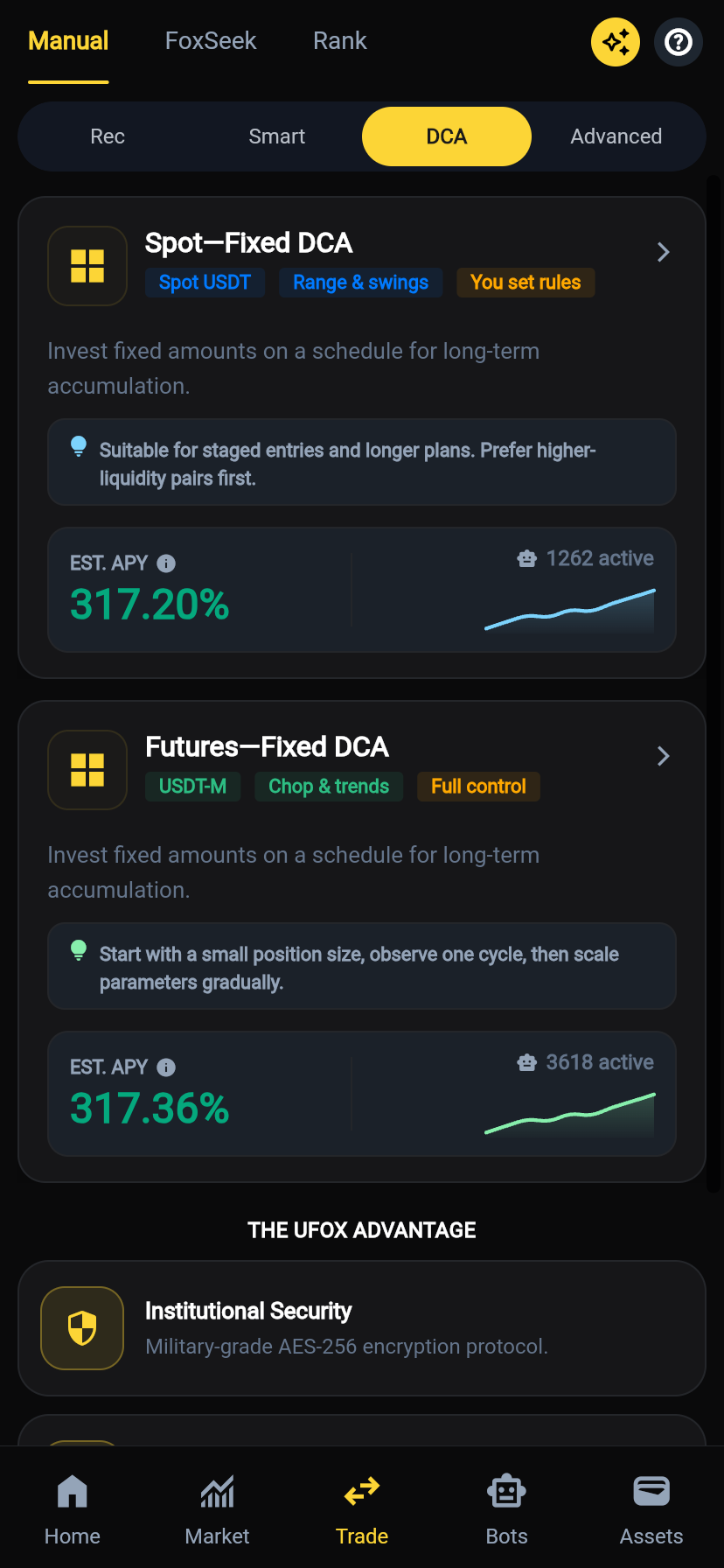
In the app, this strategy appears under Manual → DCA as Futures—Fixed DCA.
The card highlights:
- USDT-M: Uses USDT-margined futures.
- Chop & trends: Can be used in volatile or directional markets when parameters are controlled carefully.
- Full control: Users set leverage, order count, period, take-profit, and trailing settings.
- EST. APY / active bots: Display indicators only. They are not guaranteed returns.
⚙️ 1. Core Parameters
💰 Fixed Investment Amount
- Defines the margin or order amount used each time the strategy runs.
- The amount should be small enough to leave room for scheduled orders and margin changes.
💡 Futures Fixed DCA should be tested with small size before increasing exposure.
📊 Max Orders
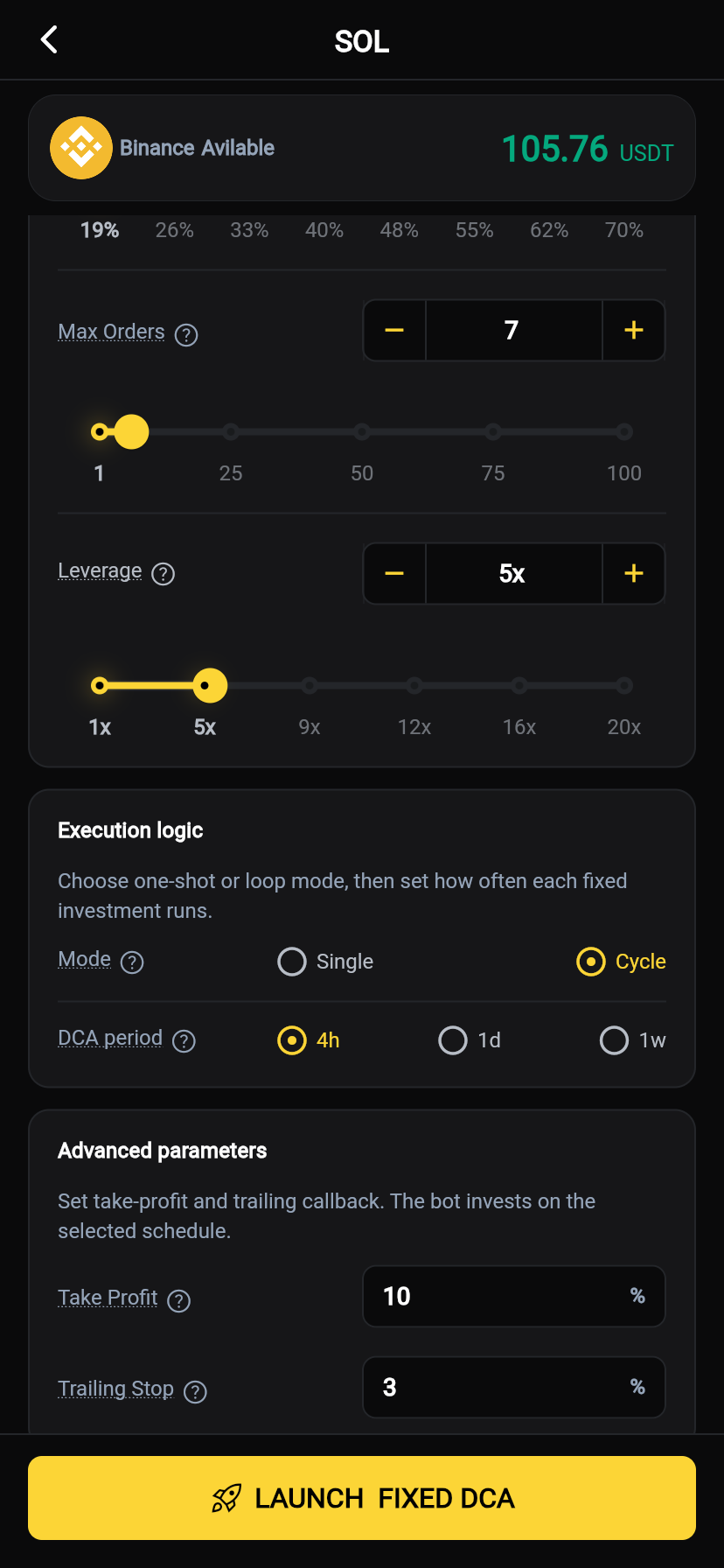
- Sets the maximum number of scheduled futures entries in one DCA round.
- Example shown in the app:
7.
📌 Higher value:
- Spreads entries over more scheduled executions.
- Requires more margin planning.
📌 Lower value:
- Completes the round faster.
- Concentrates exposure into fewer entries.
⚡ Leverage
- Sets the futures leverage used by the strategy.
- Example shown in the app:
5x.
⚠️ Leverage impact:
- Amplifies profit and loss.
- Increases liquidation risk.
- Requires active attention to margin and liquidation price.
💡 Beginners should use low leverage and small fixed investment amounts.
🔄 2. Execution Logic
🔁 Mode
Single
- Runs one fixed-investment round and stops after the configured conditions are met.
Cycle
- Restarts the strategy after a round ends, allowing repeated scheduled futures entries.
💡 Cycle mode should be used carefully in futures because exposure can rebuild automatically.
⏱️ DCA Period
- Controls how often each fixed futures entry runs.
- Common options shown in the app:
4h,1d,1w.
📌 Shorter period:
- Faster position building.
- Higher chance of margin being used quickly.
📌 Longer period:
- Slower execution.
- More time to observe market and margin conditions.
🧠 3. Advanced Parameters
📈 Take Profit
- Defines the profit level at which the bot can close the strategy.
- Example shown in the app:
10%.
💡 Futures strategies often use lower take-profit targets than spot because leverage magnifies movement.
📉 Trailing Stop
- Helps protect profit after the futures position moves favorably.
- Example shown in the app:
3%.
💡 A tighter trailing setting may protect profit faster, but can also close early during normal volatility.
🛡️ 4. Profit Safeguards
🎯 Strategy Profit Target
- Optional total profit target in
USDT. - When the strategy reaches the target, the bot can stop or close according to the configured logic.
This is useful when you want a fixed profit objective for a leveraged strategy.
💼 5. Strategy Logic
🔁 How It Works
- Select the futures pair and confirm available margin.
- Set the fixed investment amount.
- Set Max Orders and Leverage.
- Choose Single or Cycle mode.
- Set the DCA Period.
- Configure Take Profit, Trailing Stop, and optional Strategy Profit Target.
- Launch the bot. It opens scheduled futures entries according to the selected rules.
📊 Example Flow
- Fixed amount:
20 USDT - Max Orders:
7 - Leverage:
5x - DCA Period:
4h - Mode:
Cycle
➡️ The bot opens a futures entry on each scheduled run.
➡️ Leverage increases the effective exposure of each entry.
➡️ Take Profit and Trailing Stop manage exit logic when the position moves favorably.
📈 Strategy Advantages
✅ Full Manual Control
Users define schedule, leverage, order count, and exit logic.
✅ Scheduled Execution
The bot follows a fixed rhythm without manual order placement.
✅ Flexible Futures Exposure
Can be adjusted for different time horizons and market views.
✅ Profit Protection Tools
Take Profit, Trailing Stop, and Strategy Profit Target help define exits before launch.
⚠️ Risk Disclaimer
- Futures trading involves high risk and can lead to liquidation.
- Leverage magnifies both gains and losses.
- Cycle mode can rebuild exposure automatically after a round ends.
- Take Profit and Trailing Stop may not execute as expected during fast markets or low liquidity.
- Historical APY shown in the app does not guarantee future returns.
Always monitor leverage, margin ratio, liquidation price, and total allocated capital.
💡 Starter Setup Reference
| Parameter | Conservative Start |
|---|---|
| Fixed Investment Amount | Small amount per order |
| Max Orders | 3-7 |
| Leverage | 1x-5x |
| DCA Period | 4h or 1d |
| Mode | Single for testing |
| Strategy Profit Target | Optional |
🦊 Summary
The Futures Fixed DCA Bot is designed for users who want scheduled futures entries with manual leverage and profit controls.
By combining fixed investment + scheduled execution + leverage management, it gives experienced users a structured way to run recurring futures strategies while keeping risk settings explicit.